
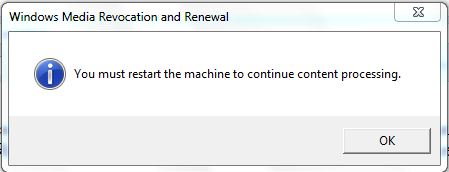
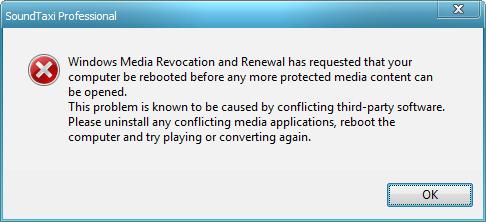
1. Reasons of the "Windows Media Revocation and Renewal has requested that your computer be rebooted before any more protected media content can be opened" error
A small subset of our users might experience the "Windows Media Revocation and Renewal has requested that your computer be rebooted before any more protected media content can be opened" error while using SoundTaxi on a Windows Vista / Windows 7 system in combination with some antivirus products or tools that extend Windows user experience (e.g. Logitech SetPoint or Microsoft Table PC support). There are lots of products that may provoke the error and the error itselft is not related to SoundTaxi installation or functionality in any way.
The "Windows Media Revocation and Renewal has requested that your computer be rebooted before any more protected media content can be opened" error occurs because Windows Media Player's ability to play protected songs is limited to ~30 files. When one of the conflicting tools (not SoundTaxi) is installed on the system, Windows OS wrongly identifies user attempt to play numerous songs in WMP as license violation and initiates Revocation and Renewal procedure. In such case, user is shown R&R error message box and has to restart his computer in order to proceed with protected media playback.
2. Troubleshooting the SoundTaxi R&R error how-to
We are aware of this issue and have a stable fix. Follow this guide in order to troubleshoot and eliminate the SoundTaxi R&R issues you are having.
Before you start, make sure your SoundTaxi and Windows OS software are up to date:
- Download the latest SoundTaxi software
- Update Windows OS with the built in Windows Update tool
Follow these steps in order to troubleshoot the R&R error on your PC:
Method I
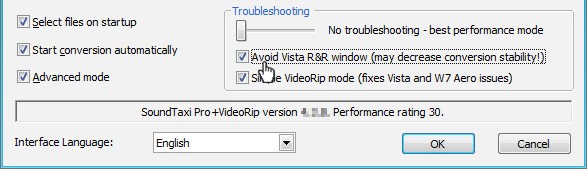
1. Select the "Avoid Vista R&R window" option in SoundTaxi. Open SoundTaxi and click the "Settings" button.

In the "Troubleshooting" section, make sure "Avoid Vista R&R window" is checked. Click "OK".
2. Close SoundTaxi and restart your PC.
3. Run SoundTaxi as "Administrator". Right-click the SoundTaxi icon and select "Run as Administrator". When a dialogue window pops up, click "Yes".
Note: After you complete the above steps, SoundTaxi will be able to detect R&R conflicts. SoundTaxi will notify you which component is causing a conflict. You will then be able to take the appropriate steps to fix the conflicting component.
Method II
If SoundTaxi didn't notify you, which component is causing a conflict (like it is shown on the picture below),
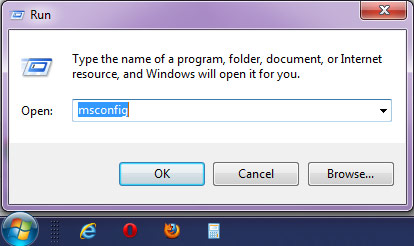
Please click Start->Run-> type "msconfig",
and disable everything from "Startup" and all 'services' except GSService, SMServer and those from Microsoft.
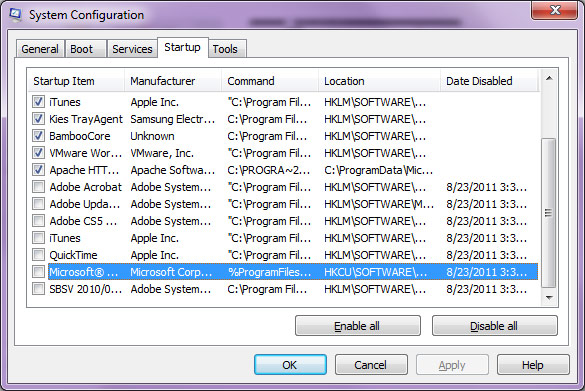
Then reboot and try to convert more then 30 files.
Method III
If the problem stays on, please contact our support team support@soundtaxi.info and send us your activity.log from "SoundTaxi error report" folder on your desktop. It must be generated each time when the problem occurs and "Avoid Vista R&R window" option is enabled. Our support team will notify you which component is causing a conflict and how to avoid the problem.